Parrot
Checked 24 September 2026
Parrot vs Otter
Otter is a cloud transcription service. Its notetaker bot can join your Zoom, Meet and Teams calls from your calendar, and the transcripts live in Otter's cloud. Its desktop app can also record without a bot. Parrot records and transcribes on your Mac, and helps during the call with answers from your own documents. Otter covers more devices and bigger teams; Parrot keeps calls on your Mac and has no minute limits.
Released 24 Sept 2026. 17 MB. macOS 14 or later on Apple Silicon. or build from source
The short answer
Pick Parrot if
you want calls kept on your Mac, no minute limits, or help during the call in your own language.
Pick Otter if
you want a bot to cover meetings you miss, need apps on every device, or share transcripts across a company.
The big differences
Price
Parrot
YesFree, no account
Otter
Partly300 free minutes, then from $8.33 a month
Where your audio goes
Parrot
YesStays on your Mac
Otter
NoOtter's cloud
Help during the call
Parrot
YesAnswers from your documents
Otter
PartlyA chat, when you ask
What help during the call looks like
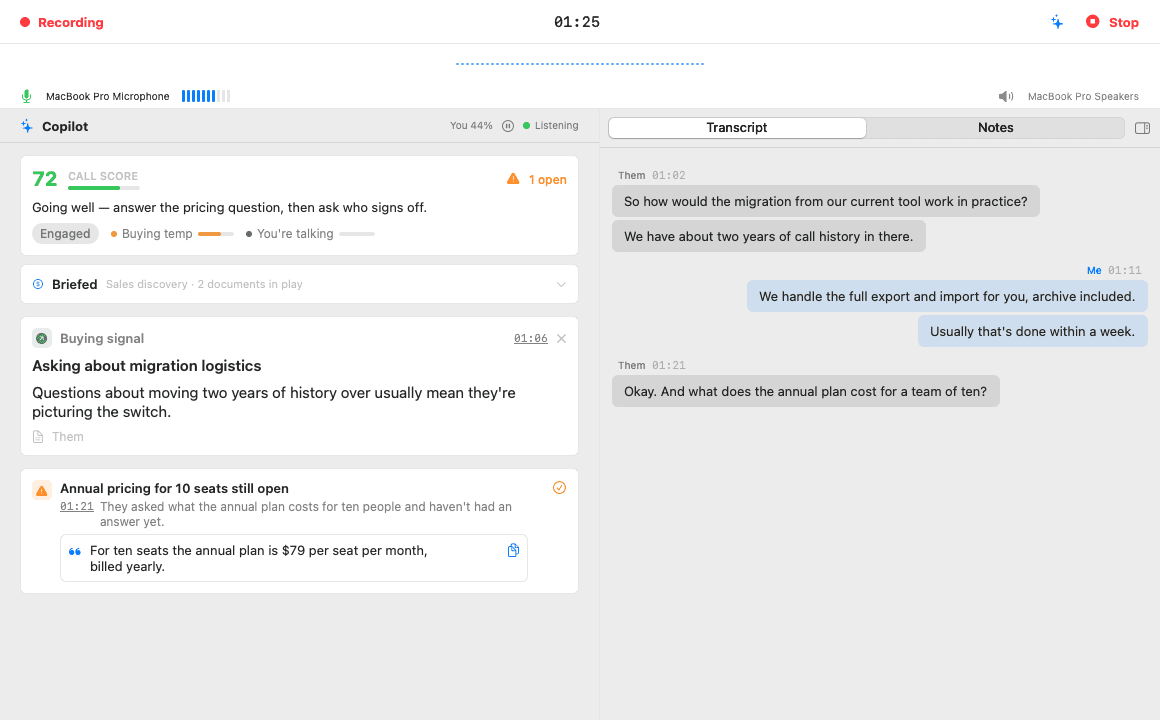
When the other side asks something your documents cover, the answer appears on a card within seconds, with the file it came from. Open questions stay pinned until you answer them, and a one-line coach tells you how the call is going.
Feature by feature
| Feature | Parrot | Otter |
|---|---|---|
| Privacy | ||
| Bot in the call | YesNo. It records what your Mac plays and hears. | PartlyYes, a bot can join from your calendar. The desktop app can also record without one. |
| Where your audio goes | YesStays on your Mac. Sent out only if you pick Groq or Deepgram for transcription. | NoTo Otter's cloud, stored in the US. |
| Works offline | YesYes, with Whisper and Ollama. | NoIt can record offline and upload later. Transcription needs the internet. |
| Open source | YesYes, GPL-3.0. | NoNo. |
| During the call | ||
| Help during the call | YesYes. Answers from your own documents, open questions pinned, a live coach. | PartlyA live transcript and a chat you can ask. Live coaching is Enterprise only. |
| Choice of AI | YesClaude, Ollama, or any OpenAI-compatible server, with your own keys. | NoChosen by Otter. No local models or your own keys listed. |
| Cost and platforms | ||
| Price | YesFree. No paid plan. Cloud AI with your own key costs a few cents per call hour. | PartlyFree: 300 minutes a month, 30 minutes per call. Pro is $8.33 per user a month billed yearly, or $16.99 monthly. Business is $19.99 billed yearly. |
| Runs on | PartlyMac only: macOS 14 or later on Apple Silicon. | YesMac, Windows, iPhone, Android, the web and a Chrome extension. |
Where Otter is better
- A bot that can join and record meetings you can't attend, straight from your calendar.
- Apps for Windows, iPhone, Android and the web.
- CRM sync with Salesforce and HubSpot, plus Zapier.
- Team sharing: channels, a shared vocabulary and search across your company's meetings.
- Admin and compliance for companies: SOC 2, SSO and a HIPAA add-on.
Where Parrot is better
- No bot and no cloud. Your audio stays on your Mac.
- No minute limits. Otter's free plan stops at 300 minutes a month.
- Answers from your own documents during the call, without having to ask.
- Transcribes dozens of languages and detects which one. Otter lists six.
- Open source, and it works offline.
Try both on the same call
- 1
Keep Otter
Nothing to cancel or move. Parrot works on its own, next to what you already use.
- 2
Hit record in Parrot on your next call
It records what your Mac hears, so both can record the same call.
- 3
Compare afterwards
Read both sets of notes and keep whichever helped more. Parrot costs nothing to try or to keep.
Questions
- Can I use Parrot and Otter together?
- Yes. They don't touch each other, and Parrot never joins the call, so it adds nothing the other people can see.
- Why is Parrot free?
- It started as Uygar's own tool for client calls and is open source under GPL-3.0. There are no servers to pay for, because it all runs on your Mac. If you use cloud AI, you pay that provider directly with your own key, usually a few cents per call hour.
- Can I bring my Otter recordings?
- If you have the audio as a file, yes. Drop it on Parrot and it's transcribed, split by speaker and summarised like a live call. Notes you wrote in Otter stay there.
- Is Parrot on Windows or iPhone?
- No. Parrot is Mac only: macOS 14 or later on Apple Silicon. If you need another platform, Otter is the better pick.
Sources, checked 24 September 2026
Checked on 24 September 2026 against their own pages. Prices and features change, so check before you buy. If something here is out of date, email me and I'll fix it.