Parrot
Checked 24 September 2026
Parrot vs Anarlog
Anarlog is the open-source meeting notepad that used to be called Hyprnote. Like Parrot, it records on your computer with no bot in the call, and it's free to start. The difference is what it does for you. Anarlog is a notepad: you write during the call and it tidies up after. Parrot is a copilot: it suggests answers from your own documents while you're still talking.
Released 24 Sept 2026. 17 MB. macOS 14 or later on Apple Silicon. or build from source
The short answer
Pick Parrot if
you want help while the call is happening, answers from your own files, or automatic speaker names for free.
Pick Anarlog if
you need Windows, Linux or an Intel Mac, want integrations and team sharing, or like writing your own notes during the call.
The big differences
Price
Parrot
YesFree, no account
Anarlog
YesFree, Pro $15 a month
Where your audio goes
Parrot
YesStays on your Mac
Anarlog
PartlyOn your computer, on Apple Silicon
Help during the call
Parrot
YesAnswers from your documents
Anarlog
PartlyYour own notes, no suggestions
What help during the call looks like
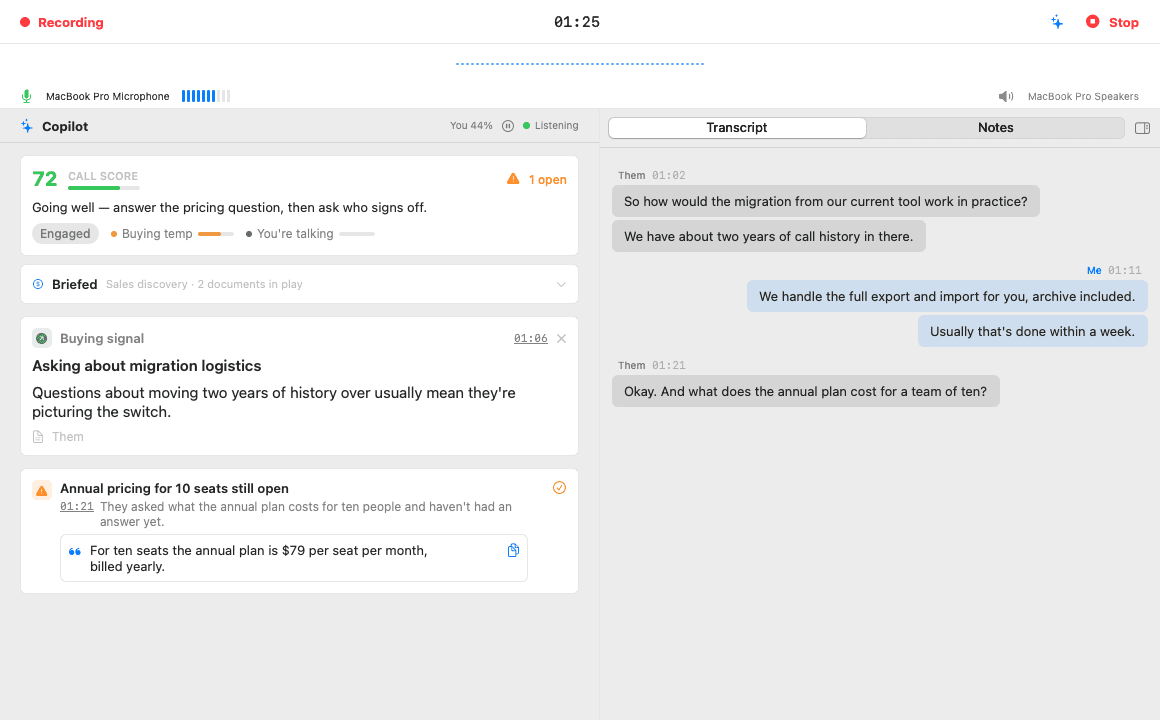
When the other side asks something your documents cover, the answer appears on a card within seconds, with the file it came from. Open questions stay pinned until you answer them, and a one-line coach tells you how the call is going.
Feature by feature
| Feature | Parrot | Anarlog |
|---|---|---|
| Privacy | ||
| Bot in the call | YesNo. It records what your Mac plays and hears. | YesNo. It records your mic and system audio on your computer. |
| Where your audio goes | YesStays on your Mac. Sent out only if you pick Groq or Deepgram for transcription. | PartlyKept on your computer. On-device transcription needs an Apple Silicon Mac; elsewhere it uses a cloud service or your own server. |
| Works offline | YesYes, with Whisper and Ollama. | PartlyYes on Apple Silicon Macs, or with your own local server. |
| Open source | YesYes, GPL-3.0. | YesYes, MIT, apart from an enterprise folder under a paid license. |
| During the call | ||
| Help during the call | YesYes. Answers from your own documents, open questions pinned, a live coach. | PartlyYour own notes and a live transcript. No live suggestions listed. |
| Choice of AI | YesClaude, Ollama, or any OpenAI-compatible server, with your own keys. | YesOllama, LM Studio, Apple Intelligence, your own keys, or a Claude or ChatGPT subscription. |
| Cost and platforms | ||
| Price | YesFree. No paid plan. Cloud AI with your own key costs a few cents per call hour. | YesFree. Pro is $15 a month or $150 a year. Team is $20 per person a month. |
| Runs on | PartlyMac only: macOS 14 or later on Apple Silicon. | YesMac (Apple Silicon and Intel, macOS 15 or later). Windows and Linux in beta. |
Where Anarlog is better
- Installers for Intel Macs, Windows and Linux.
- Integrations and automations: Slack, Notion, Linear and your calendar, plus a command line tool, an MCP server and webhooks.
- A Team plan with shared workspaces, and encrypted sync across your devices.
- Summary templates, and a chat that searches your past meetings.
Where Parrot is better
- Help during the call: answers from your own documents, pinned questions and a live coach.
- Automatic speaker names on your Mac for free, and it remembers voices for next time.
- Everything is free. There's no Pro plan for cloud features, because there's no cloud.
- It runs on macOS 14 as well as newer versions.
Try both on the same call
- 1
Keep Anarlog
Nothing to cancel or move. Parrot works on its own, next to what you already use.
- 2
Hit record in Parrot on your next call
It records what your Mac hears, so both can record the same call.
- 3
Compare afterwards
Read both sets of notes and keep whichever helped more. Parrot costs nothing to try or to keep.
Questions
- Can I use Parrot and Anarlog together?
- Yes. They don't touch each other, and Parrot never joins the call, so it adds nothing the other people can see.
- Why is Parrot free?
- It started as Uygar's own tool for client calls and is open source under GPL-3.0. There are no servers to pay for, because it all runs on your Mac. If you use cloud AI, you pay that provider directly with your own key, usually a few cents per call hour.
- Can I bring my Anarlog recordings?
- If you have the audio as a file, yes. Drop it on Parrot and it's transcribed, split by speaker and summarised like a live call. Notes you wrote in Anarlog stay there.
- Is Parrot on Windows or iPhone?
- No. Parrot is Mac only: macOS 14 or later on Apple Silicon. If you need another platform, Anarlog is the better pick.
Sources, checked 24 September 2026
Checked on 24 September 2026 against their own pages. Prices and features change, so check before you buy. If something here is out of date, email me and I'll fix it.